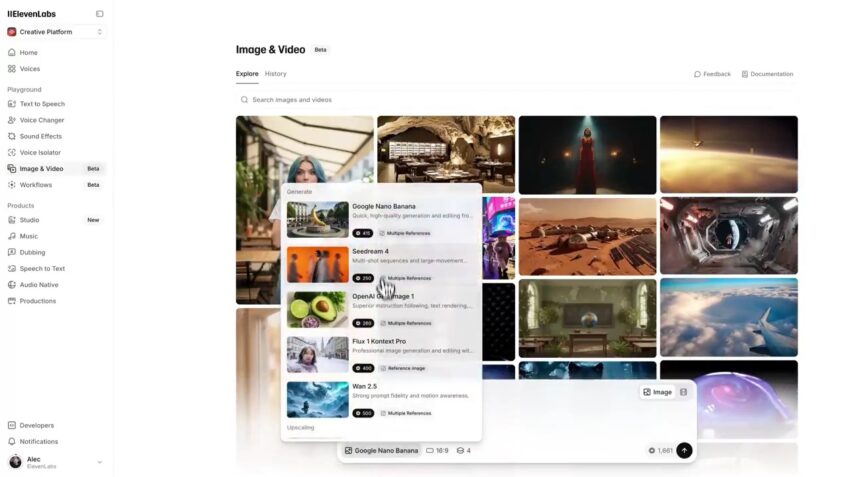
If you’ve heard of ElevenLabs, you probably know them for their incredibly realistic, human-sounding AI voices. People use it to create voiceovers, clone their own voices, or make audiobooks. Now, the company is adding a massive new set of tools to its platform: the ability to create and edit AI-generated images and videos.
Think of it like this: ElevenLabs was already a master of sound. Now, it’s adding sight to its toolkit, aiming to become a one-stop shop for anyone who wants to create content. Let’s break down what this new “Image & Video (Beta)” feature means for you, in simple terms.
What Can You Do With This New Feature?
Before this update, if you wanted to make a video with an AI voice, you had a multi-step process. You’d have to:
- Go to an AI video generator (like Sora or Kling) to make your video clips.
- Go to an AI image generator (like Midjourney) to make a thumbnail.
- Go to ElevenLabs to create your voiceover.
- Go to a video editing program (like Adobe Premiere) to put them all together.
The new ElevenLabs update tries to put all of those steps into one single platform.
Here’s what it lets you do:

- Create Videos and Images from Scratch: Just like you type a sentence to get a voice, you’ll be able to type a description (like “a happy dog wearing a tiny hat”) to create a video clip or a still image.
- Use the “World’s Best” Tools: ElevenLabs isn’t trying to build all this new technology from scratch. Instead, it’s plugging in some of the most powerful and famous AI models out there, like Sora (from OpenAI), Veo (from Google), and Kling. This means you get top-quality videos and images without having to sign up for all those different services.
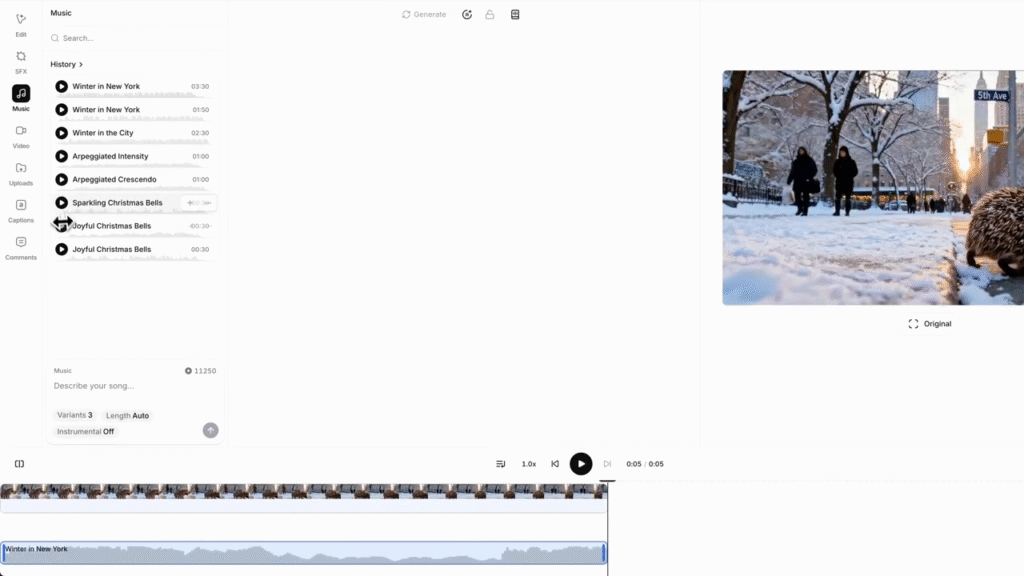
- Edit Everything in the “Studio”: This is the most important part. Once you’ve made your video clips, you can bring them into the ElevenLabs “Studio.” This is their built-in editor where you can:
- Add Your Voice: Use their famous text-to-speech, your own voice clone, or a voice from their library for narration.
- Add Music & Sound Effects: Layer in background music or sounds (like a door creaking or a crowd cheering).
- Compose Clips: Arrange your video clips in order, trim them, and create a full story.
- Export: When you’re done, you can save the final, polished video.
Pro-Level Tools, Explained Simply
The new update also includes some very cool “pro” features that are now much easier to use:
- Add Automatic Lipsync: This is a big one. Have you ever seen a video where the words don’t match the person’s mouth? It looks awful. This feature lets you add a voiceover to a video of a person, and the AI will automatically make their lips move perfectly in sync with the new audio.
- Upscale Your Content: Sometimes AI videos can look a little blurry or low-quality. ElevenLabs has included a tool (using “Topaz” technology) that sharpens, or “upscales,” your images and videos to make them look high-resolution and professional.
- Swap Voices Easily: Don’t like how your video sounds with one voice? You can easily “swap” it for another from their library to see what fits best.
Why This is a Big Deal
This update isn’t just about adding one new feature; it’s about changing the entire workflow for creators. ElevenLabs is building what it calls a “unified creative platform.”
The goal is to stop creators from having to jump between five different apps and subscriptions. It wants to be the single place where you can go from a simple idea in your head to a fully produced, high-quality video with professional sound, all without leaving their website.
For a non-tech person, this means the complicated process of making AI content is about to get a whole lot simpler. You’ll just need to learn one tool that does everything.
The “Image & Video” feature is launching in “Beta,” which means they are still testing and improving it. To celebrate, they are also offering a 22% discount for a limited time on their paid plans for anyone who wants to try it.