Have you ever wanted to make a professional-looking video but didn’t have the camera, the time, or the confidence to be on screen? Google has just launched something that could change all of that. It’s a new feature in a tool called Google Vids, and it lets you create videos with realistic, AI-powered “digital humans” or “avatars.”
Think of it like having a team of actors ready to present your ideas, but they’re all digital and available for free! This new update is designed to be super easy to use, so even if you’re not a tech wizard, you can create high-quality videos in just a few minutes.
What Exactly Are These “AI Avatars”?
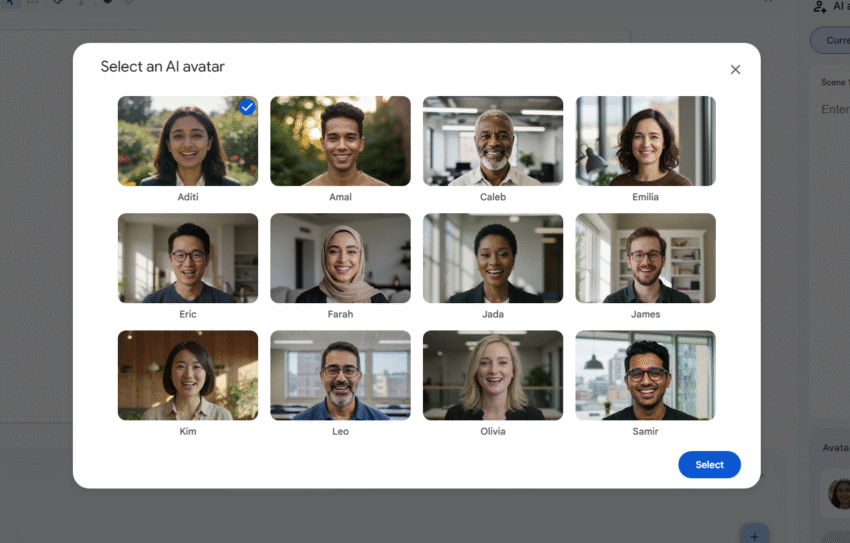
Imagine a digital character that looks and sounds like a real person. That’s an AI avatar. Google Vids gives you 12 different pre-made avatars to choose from. Each one has a unique look and a natural-sounding voice.
These aren’t just simple cartoons. Thanks to some very smart technology from Google (called Veo 3 and Gemini AI), these digital humans have:
- Natural Facial Expressions: They can smile when talking about something happy or look serious when the topic is more formal. They understand the “feel” of your script.
- Accurate Lip-Syncing: When they speak, their lip movements match the words perfectly, just like a real person.
- Realistic Body Language: The avatars use hand gestures and body movements that make them look more natural and engaging.
How Does It Work? It’s as Easy as 1-2-3
Creating a video with these AI avatars is incredibly simple. Here’s all you have to do:
- Write Your Script: Type out what you want your digital person to say. This can be anything from a business presentation to a quick announcement or a tutorial.
- Choose Your Avatar: Browse through the 12 available digital humans and pick the one that best fits the style and tone of your video.
- Generate Your Video: With a click of a button, Google Vids will bring your script to life. The AI avatar you chose will recite your words in a professional-looking video that’s up to 30 seconds long.
What’s the Catch?
While this tool is powerful, there are a few things to keep in mind for now:
- English Only: Currently, the avatars can only speak English.
- No Customization: You can’t create a digital version of yourself or clone your own voice just yet. You have to use one of the 12 pre-set options.
The biggest advantage Google Vids has over other similar tools is that it’s completely free for personal use. This makes it accessible to everyone.
Who Is This For? (Hint: Pretty Much Everyone!)
You might be wondering, “What would I use this for?” Here are a few ideas for how this technology can be helpful for businesses and individuals:
- For Businesses:
- Employee Training: Companies can create quick and consistent training videos for their staff. This saves a lot of time and money compared to hiring a film crew.
- Company Announcements: Instead of a long email, managers can have a friendly digital human deliver company news or updates.
- Customer Help Videos: Businesses can create simple how-to guides or answer frequently asked questions to help their customers.
- For Individuals:
- School Projects: Students can create engaging presentations without having to be on camera.
- Social Media Content: Quickly generate short, informative videos to share with your followers.
- Personal Messages: Send a unique video message for a birthday or a special occasion.
In short, Google Vids is making video creation much more approachable. It’s taking away the scary parts like being on camera or needing expensive equipment and letting you focus on your message. It’s a powerful new tool that puts the ability to create professional videos in everyone’s hands.
Related Links