
If you’ve ever felt overwhelmed by research, trying to keep track of notes, articles, and your own thoughts, Google has a tool called NotebookLM that’s designed to help. Think of it as a super-smart digital notebook that doesn’t just store your information but actually understands it. You can upload your documents, lecture notes, or articles, and then “talk” to them asking questions, getting summaries, or brainstorming ideas.
This week, Google rolled out three major updates that make this tool even more powerful and easier to use. Let’s break down what’s new, in simple terms.
1. Your AI Can Now See Your Notes (Images as Sources)
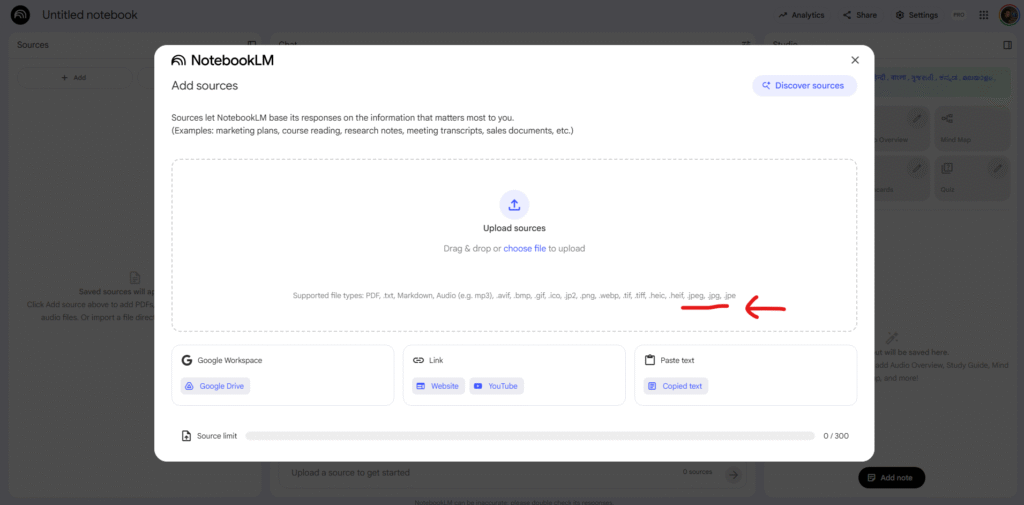
This is a big one. Before, NotebookLM could only read text you typed or documents you uploaded (like PDFs or Google Docs). Now, it can “see” and “read” images.
- What this means: You can take a photo of your handwritten notes from class, a screenshot of a textbook page, or even a complex graph from a presentation, and upload it directly to NotebookLM.
- Why it’s useful: The AI will analyze the image, understand the text and data inside it, and add that information to its “brain.” You can then ask questions about your handwritten notes just like you would a typed document. For example, you could upload a photo of a graph and ask, “What trend does this graph show?” or upload your class notes and say, “Summarize the key points about physics from my notes.”
2. You Can Finally Save Your Conversation (Chat History)
🚨 NotebookLM is rolling out Chat History!
— NearExplains AI (@nearexplains) November 14, 2025
• This much-requested feature lets you close a session and resume it later without losing your conversation.
• You can delete your history at any time.
• In shared notebooks, your chat history is visible only to you. pic.twitter.com/d0ZTwAoQ7D
One of the most-requested features is finally here. Previously, if you closed your NotebookLM session, your entire conversation with the AI was gone.
- What this means: NotebookLM now automatically saves your chat history. You can close the window, take a break, and when you come back, your conversation will be right where you left off.
- Why it’s useful: This turns NotebookLM from a one-time tool into an ongoing project partner. You can build on your ideas day after day without having to start from scratch.
- What about privacy? Google also thought about this. You have full control and can delete your history at any time. Plus, if you share your notebook with someone else, your personal chat history remains visible only to you.
3. It Can Do the Research For You (“Deep Research” Feature)

This new feature is like having a personal research assistant built directly into your notebook.
- What this means: When you’re working on a topic (like “Science in Motion,” as shown in the example), you can use the “Deep Research” feature. NotebookLM will scan hundreds of websites to find relevant information.
- Why it’s useful: It doesn’t just dump a list of links on you. Instead, it creates a clean, organized report that summarizes everything it found. Best of all, it gives you an “annotated list of all the sources.” This means it tells you where it got each piece of information, so you can check it for yourself.
- How you use it: Once the report is generated, you can add it and all its sources directly to your notebook with a single click, making it part of your project materials.
In short, these updates make NotebookLM a much more complete tool. It can now remember your work (Chat History), read notes in any format (Image Sources), and even go out and find new information for you (Deep Research). It’s becoming less like a simple notebook and more like a true partner for learning and research.