You’ve probably used technology that turns spoken words into text. This is often called “Speech-to-Text” or “Automatic Speech Recognition” (ASR). Think about your phone’s voice assistant, a service that creates captions for videos, or an app that types out your voice notes.
For a long time, these tools were great at capturing what was said, but they had a big problem, especially with recordings of more than one person.
The Old Problem: A “Wall of Text”
Imagine recording an important one-hour meeting with three different people. You use a transcription service to get a text file of the conversation. What you get back is a “wall of text”—a long, continuous script of everything that was said.
The problem? You have no idea who said what. Was it your boss who approved the new budget, or was it your colleague who suggested it? You have to listen to the entire recording again, text in hand, just to figure it all out. This is a common headache for anyone transcribing interviews, podcasts, or team meetings.
The Solution: OpenAI’s New “Diarization” Model
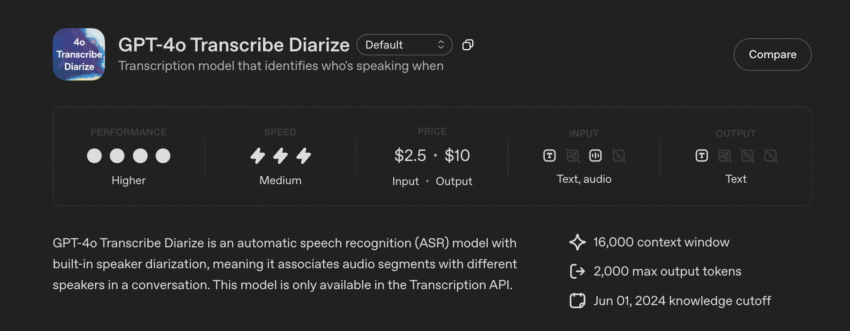
OpenAI has just launched a new, powerful model to fix this exact problem. It’s called gpt-4o-transcribe-diarize.
The magic word here is “diarize.”
In simple terms, diarization is the process of figuring out “who spoke when.”
This new tool doesn’t just transcribe the audio; it also identifies the different speakers in the recording. Instead of a messy wall of text, you get a clean, organized script that looks something like this:
[00:01:05] Speaker 1: I think we should move forward with the project. [00:01:08] Speaker 2: I agree, but what about the budget? [00:01:11] Speaker 1: We have approval for the first phase. [00:01:14] Speaker 3: That’s great news. Let’s get started.
This is a massive improvement, making transcripts clear and useful right away.
OpenAI just launched a new model: gpt-4o-transcribe-diarize.
— NearExplains AI (@nearexplains) October 24, 2025
• It's an ASR model that transcribes audio.
• Its special feature is "diarization"—it identifies who is speaking.
• You can provide voice samples of known people upfront for better accuracy. pic.twitter.com/Ix56cqI0Us
How Does It Work? (And Its Coolest New Feature)
This model is smart. It can listen to an audio file and automatically tell different voices apart. Even if you don’t give it any names, it will label the speakers (like “Speaker 1,” “Speaker 2,” etc.) so you can follow the conversation.
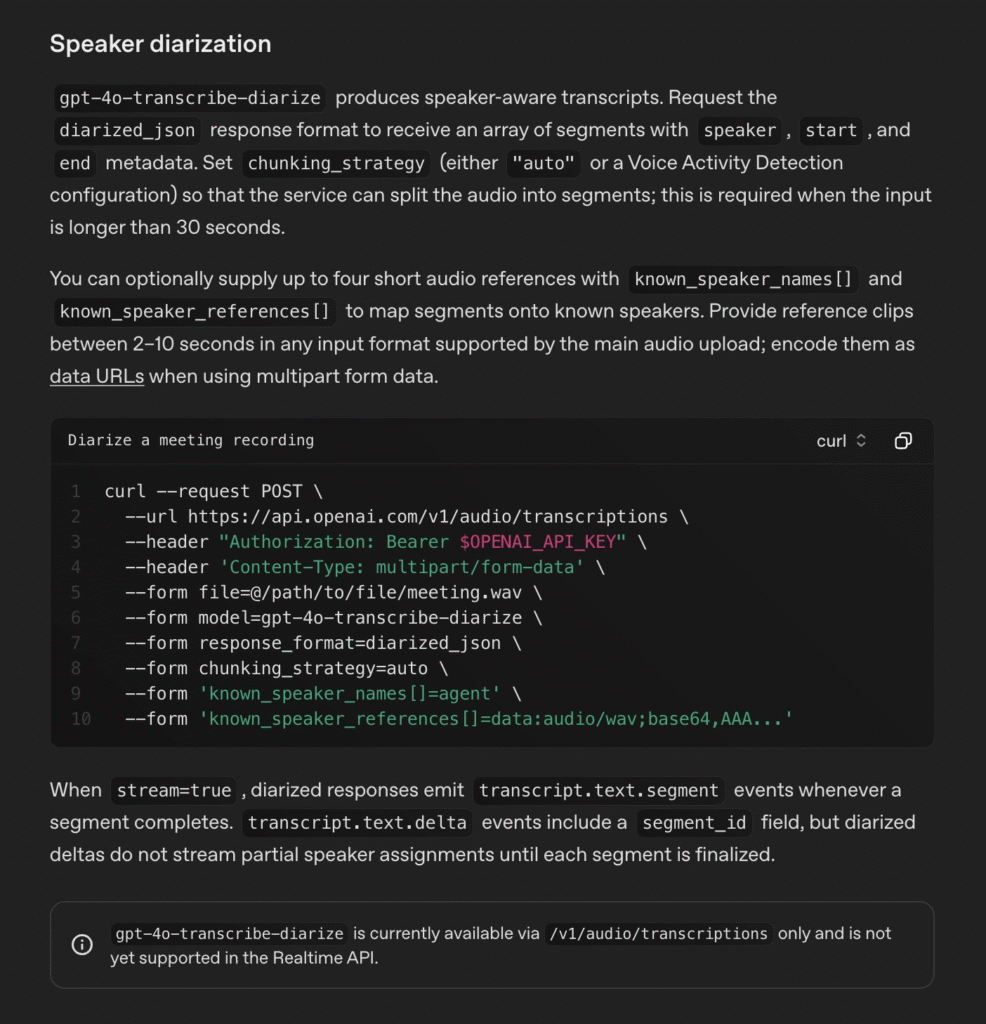
But here’s the most exciting part: you can “introduce” the speakers to the model.
Let’s say you have a recording of a podcast with two hosts, “Jane” and “John.” Before you ask the model to transcribe the file, you can give it two small audio samples:
- A 10-second clip of just Jane talking.
- A 10-second clip of just John talking.
You tell the model, “This first clip is ‘Jane,’ and this second clip is ‘John.'”
Now, when the model processes your podcast, it won’t just say “Speaker 1” and “Speaker 2.” It will label the transcript with their actual names:
[00:22:14] Jane: And that’s our show for this week! [00:22:17] John: Thanks for listening. We’ll see you next time.
This ability to recognize and name known speakers makes it incredibly powerful.
Who Is This For, and Why Is It a Big Deal?
This update is a game-changer for many people:
- Meetings: Get perfect notes of who committed to what task.
- Interviews: Journalists and researchers can easily quote the right person without re-listening for hours.
- Podcasts: Producers can create accurate scripts for editing or for publishing on their website.
- Customer Support: Companies can analyze customer service calls to see what the agent said and what the customer said, helping to improve training.
- Legal: Creating accurate, speaker-labeled transcripts of depositions or hearings is now much easier.
One Thing to Keep in Mind: It’s Built for Quality, Not Speed
Based on the information available, this new model is a “heavy-duty” tool. It’s described as “big and slow” (by tech standards), which means it’s designed to be extremely accurate.
It’s best for offline processing. This means you use it on audio files you’ve already recorded. It’s not necessarily built for the kind of instant, real-time transcription you see during a live presentation. The focus here is on getting the most accurate and detailed transcript possible from a finished recording.
Conclusion
OpenAI’s gpt-4o-transcribe-diarize model is a significant step forward. It solves one of the biggest frustrations with audio transcription. By answering “who said what,” it turns a simple transcript into a truly useful, organized, and searchable document.
Source: OpenAI