Have you ever sent a Direct Message (DM) on X (formerly Twitter) and immediately wished you could take it back? Maybe you sent it to the wrong person, made a typo, or just changed your mind. We’ve all been there.
The good news is, X has quietly rolled out a new feature that finally gives you that power. You can now “unsend” your DMs, removing them from the chat for everyone.
https://t.co/dSoHS7B6mQ pic.twitter.com/5xQWIZqGgh
— NearExplains AI (@nearexplains) October 26, 2025
What is the New “Delete for all” Feature?
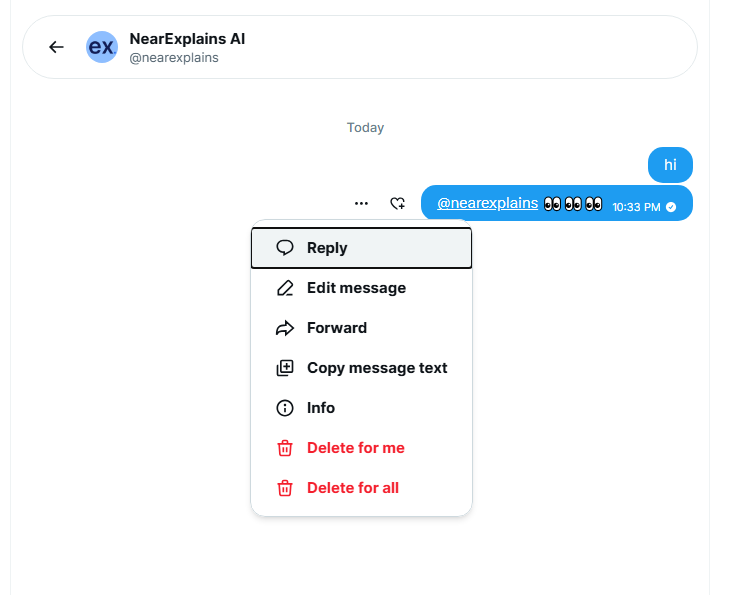
This new update adds an option called “Delete for all” to your DMs. When you use this, the message you sent disappears from the conversation entirely. It’s not just deleted from your view—it’s gone for the other person (or people) in the chat, too.
This is a huge improvement, as the old “Delete” option only ever removed the message for you, while everyone else could still see it.
How to Unsend an X DM (Step-by-Step)
Using the new feature is very simple and works just like it does on other popular messaging apps. Here’s how to do it:
- Open the X app on your phone (this is live on both iOS and Android).
- Go to your Direct Messages and open the conversation with the message you want to unsend.
- Find the specific message and press and hold your finger on it.
- A menu will pop up. You will see two delete options:
- Delete for me: This only hides the message from your own chat window.
- Delete for all: This is the “unsend” button. It will delete the message for you and for everyone else in the chat.
- Tap on “Delete for all” to unsend the message.
That’s it! Your message will be removed from the chat history for all participants.
Why This Is a Big Deal
This is a simple but important update for X users. It gives you more control over your private conversations. Now you can easily:
- Correct a mistake or a typo.
- Retract a message sent in the heat of the moment.
- Remove a message you accidentally sent to the wrong chat.
It’s a basic feature that many other platforms have had for years, and its arrival on X makes DMs feel more secure and user-friendly. This update is currently rolling out to all users on iOS and Android, so if you don’t see it yet, make sure your app is updated and check again soon.
Source
𝕏 Chat just got a new update..
— X Freeze (@amXFreeze) October 26, 2025
You can now finally unsend messages on 𝕏 chat
simply press and hold any message, then tap “Delete for all"
It's now live on both iOS and Android pic.twitter.com/DvEhllfOgj